Betmoar
A guide to Betmoar’s Polymarket web terminal and Discord interface, including market research, news, order entry, keyboard controls and costs.

In this story
Betmoar is a web terminal and Discord trading interface for Polymarket. It combines market discovery, holder analysis, market-linked news and order entry, giving traders additional ways to research events and manage their trading workflow.
The web terminal brings charts, order books, market research and order controls into one place. Its Discord integration extends that experience into community servers.
What is Betmoar?
Betmoar provides an alternative interface to Polymarket. Its public product page describes a non-custodial service, with funds remaining on the relevant Polymarket smart contracts. It also describes a Discord integration for accessing the trading experience from community servers.
The web application lets visitors browse events, inspect individual markets and view trading information. Accessing that public information is different from connecting an account and submitting an order.
What features does Betmoar have?
Market discovery and holder research
Betmoar’s navigation includes markets, news, an event calendar and resolution information. Its public market view displays prices, available liquidity and recent activity alongside holder information.
The product page also describes analysis of large positions and changes in holdings. These tools help a user investigate who is participating in a market and how positioning changes over time.
News connected to markets
The Betmoar landing page describes news gathered from social sources and associated with relevant markets. It also advertises spoken alerts. In the inspected market view, related news appeared beside the chart.
This places information discovery close to the market a user is researching.
Resolution and UMA information
Betmoar presents information about disputed market resolutions and oracle voting. Its public pages emphasize tracking disputes, evidence and large voters as part of the research workflow.
Charts, order books and order entry
The market page brings a price chart, order book, recent transactions and order ticket into one view. Its order menu includes choices for resting orders, immediate execution, all-or-nothing execution and orders activated by a condition.
The ticket also includes controls for order expiry, protective exits after an entry fills, and cancellation at a specified market-price condition.
Quantity presets and keyboard controls
Betmoar’s trade settings include five configurable quantity buttons, percentage sizing and a default quantity choice.
A separate keyboard section provides configurable bindings for submitting the current ticket, changing between buying and selling, switching the selected outcome and focusing the quantity field. A separate shortcut opens market search.
These controls support a manual workflow: the trader prepares the ticket and decides when to act. These ticket shortcuts sit alongside the quantity presets and navigation controls.
How does the web terminal fit together?
A typical exploration starts with an event. An event can contain several related markets, each with its own outcome prices and order book. Opening an individual market brings its chart, research information and trading controls into focus.
The relevant details to review are the specific market, selected outcome, order direction, price, quantity and order behavior. Chart prices and quoted liquidity provide context; the ticket defines the intended instruction.
Betmoar’s Discord integration offers another access point for people who follow markets in community servers.
What does Betmoar cost?
Betmoar’s public terminal page advertises no additional platform charge and describes its features as free. Venue fees, spreads and execution costs are separate from a terminal’s own service charge.
Check the current product page and the order details when evaluating the total cost of using it.
Who might find Betmoar useful?
Betmoar is relevant to Polymarket users who want market-linked news, holder research and resolution information near their trading interface. Its Discord integration can also suit people whose market discussions already happen in community servers.
Its web interface combines those research tools with manual order entry and keyboard controls.
Common questions
Is Betmoar the same service as Polymarket?
Betmoar is a separate interface for accessing Polymarket markets. Its own product page describes how the interface relates to the underlying service and funds.
Does Betmoar have stop loss and take profit?
The public order ticket includes a control for preparing protective exits when an entry fills.
Does Betmoar support keyboard trading?
Yes. The trade-settings panel provides configurable keyboard operations for the order ticket, alongside separate quantity presets.
Sources and observation scope
This introduction uses Betmoar’s product page, landing page and an anonymous market view. Market and settings screenshots were captured on November 4, 2026. The dated market may later resolve or become unavailable. The observations cover public controls and their descriptions. No wallet was connected, no orders or settings were submitted, and execution behavior was not tested.
HeyTraders
How do the trading tasks above look in HeyTraders? Its workspace puts market research, charts, order entry and trading history together in a layout familiar to exchange users. The examples below show how to move from understanding a market to preparing an order and managing repeated manual actions.
Market discovery and holder research
Start by finding a Polymarket event in symbol search and selecting its market and outcome. The chart’s Related area lets you inspect related markets and add them to the workspace. Beside the chart, switch between Order Book, Activity and Top Holders as you investigate the same market.
Top Holders separates participants by outcome and displays their holdings, average entry and available PNL information. Its summary brings together share exposure, cash and holder metrics, with coverage labels for missing data. This connects the holder research described above to the chart you are watching.

Social activity research
Betmoar brings market-linked news into its terminal. For Elon Musk tweet-count markets, HeyTraders offers a more specific research view: Elon Tweet Analyze. Open it from Market to inspect post counts, hourly activity, recent-window comparisons and the time zone used for those observations.
This helps you examine the posting activity behind a tweet-count question. It is a focused social-activity tool; the screen below does not represent a general news feed or Discord interface.

Resolution rules and UMA research
For the resolution workflow described above, open Market → UMA Oracle Activity in HeyTraders. Use Verify, Propose and Settled to browse requests by workflow stage, or search for the event or market you are investigating.
Opening a request shows its proposed outcome, dispute and settlement information, resolution rules and on-chain lifecycle, with source and transaction links. The chart also provides a UMA control for inspecting a linked request. This lets you read the resolution context alongside your trading research.

Multi-chart trading, chart orders and protective exits
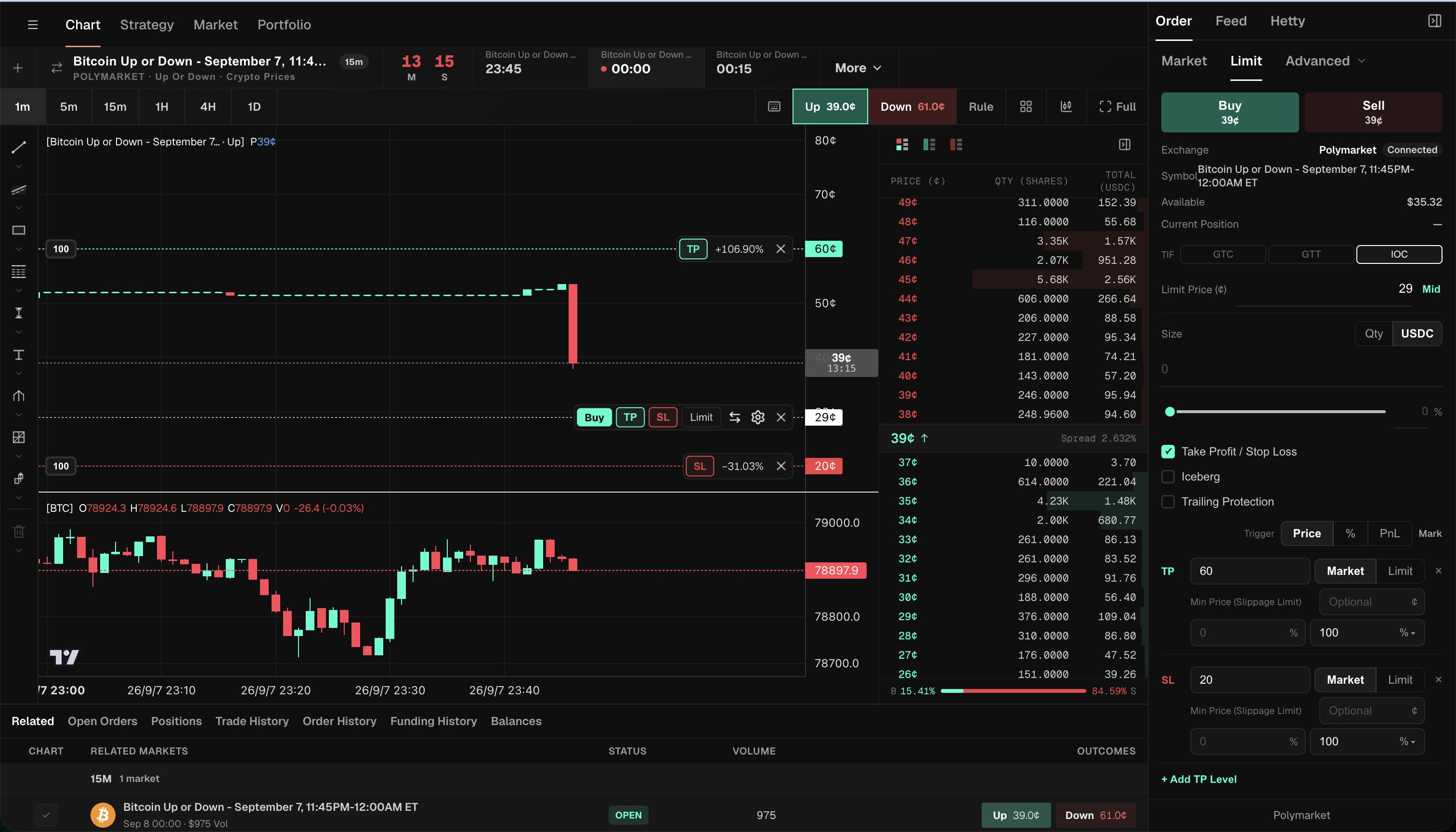
HeyTraders lets you work with multiple market charts in one workspace and place orders directly from the chart. Keep the chart, order book and order ticket together, select the intended market and outcome, and prepare the price and size in the same workspace.
For protective exits, the order controls include Take Profit / Stop Loss. Configure the trigger and exit settings, then use the chart levels to inspect the planned entry and exits together. The screenshot shows that relationship between the visual price levels and the order panel. The chart-order guide, stop-loss guide and take-profit guide explain the individual controls.
After submission, the workspace’s Open Orders, Positions, Trade History and Order History tabs help you follow what happened to the instruction.
Quantity settings and keyboard presets
Betmoar’s quantity buttons and ticket shortcuts reduce repeated input. In HeyTraders, Hotkey Trading stores actions in nine configurable slots, mapped to number keys 1–9 and the corresponding numpad keys. Set the action, size and applicable order settings, then check which chart the action will use.
The master switch and individual slot controls determine which presets are enabled. An enabled trading preset can submit its action immediately when pressed. Chart Quick Order has its own configuration; it is separate from the keyboard presets. The hotkeys guide walks through these settings.

One last thing
Was this story helpful?
Your perspective helps us improve our guides.
No sign-in needed. An anonymous session remembers your response on this browser. Privacy
A little more perspective.
What Is Polymarket? How to Read a Prediction Market
A beginner's guide to reading Polymarket. Start with the market rules, then compare the implied probability with prices in the order book.

Polymarket Chart Trading: Place Orders from Your Chart
A practical walkthrough of manual Polymarket chart orders: choose the outcome, prepare a price, review the ticket and follow the resulting order.

Polymarket Hotkeys: Set Up Keyboard Trading in HeyTraders
Configure number-key presets for manual Polymarket trading. Understand which chart a key acts on, what each slot does and when a key can submit immediately.
