Polymarket Stop Loss: How to Set It in a Trading Terminal
Set a downside exit in the HeyTraders Polymarket terminal. See the actual SL controls, choose a trigger and execution type, and review the order beside your chart.
In this story
- Does Polymarket have a native stop loss?
- What is a stop loss and how does it work on a binary market?
- Polymarket stop loss trading terminal: reading the TP/SL setup
- Stop market vs stop limit on Polymarket: which should I use?
- Trigger price vs limit price: what’s the difference?
- What does Reduce Only do on a stop loss?
- How do you attach a stop loss to a Polymarket position with Hey-Traders?
- How do I choose a stop level on a $0/$1 market?
- Related automation on Polymarket
- Risk note
- Frequently Asked Questions
A Polymarket stop loss is a conditional exit: when the monitored price reaches your downside threshold, software attempts to sell the selected outcome shares. A Polymarket trading terminal such as HeyTraders lets you configure that condition alongside your chart, order book and order ticket. The important distinction is that setting a stop does not guarantee a fill at the stop price—or a fill at all.
Yes—HeyTraders provides managed Polymarket stop-loss orders. Connect your account, select the outcome, and configure SL in the order panel rather than building an API bot. Below is the actual terminal setup, followed by the trigger and execution choices. The video above shows the HeyTraders stop loss and take profit workflow.
Does Polymarket have a native stop loss?
Polymarket’s documented order-book types are GTC, GTD, FOK and FAK; a native stop-loss trigger is not among them. Its “market” execution is implemented through marketable limit orders. HeyTraders manages the conditional part separately and submits an order to the venue once the condition is met. Source: Polymarket order lifecycle.
Do not confuse a stop with a normal sell limit below the current market. That sell limit may be immediately executable; it does not mean “wait until the price falls here.” The waiting condition is precisely what the stop-loss automation adds.
What is a stop loss and how does it work on a binary market?
For shares you already own, a stop usually watches for a decline in the price of that outcome. If you hold Up, your exit sells Up shares. Buying Down is a different action, not simply another name for closing Up.
Think of the workflow as three separate checkpoints:
- Configured: you have entered an outcome, trigger, execution choice and size.
- Accepted and monitored: the submitted instruction has been accepted and is waiting for its condition.
- Executed: an exit order has actually filled, changing your position.
A visible chart line only helps you review the setup. It cannot, on its own, establish the second or third checkpoint. Review order status and trade history as well.
Polymarket stop loss trading terminal: reading the TP/SL setup
The configuration example uses the HeyTraders chart and order panel together. It shows a Buy level at 29¢, a take-profit level at 60¢, and a stop-loss level at 20¢. These are illustrative settings, not suggested prices for a current market.
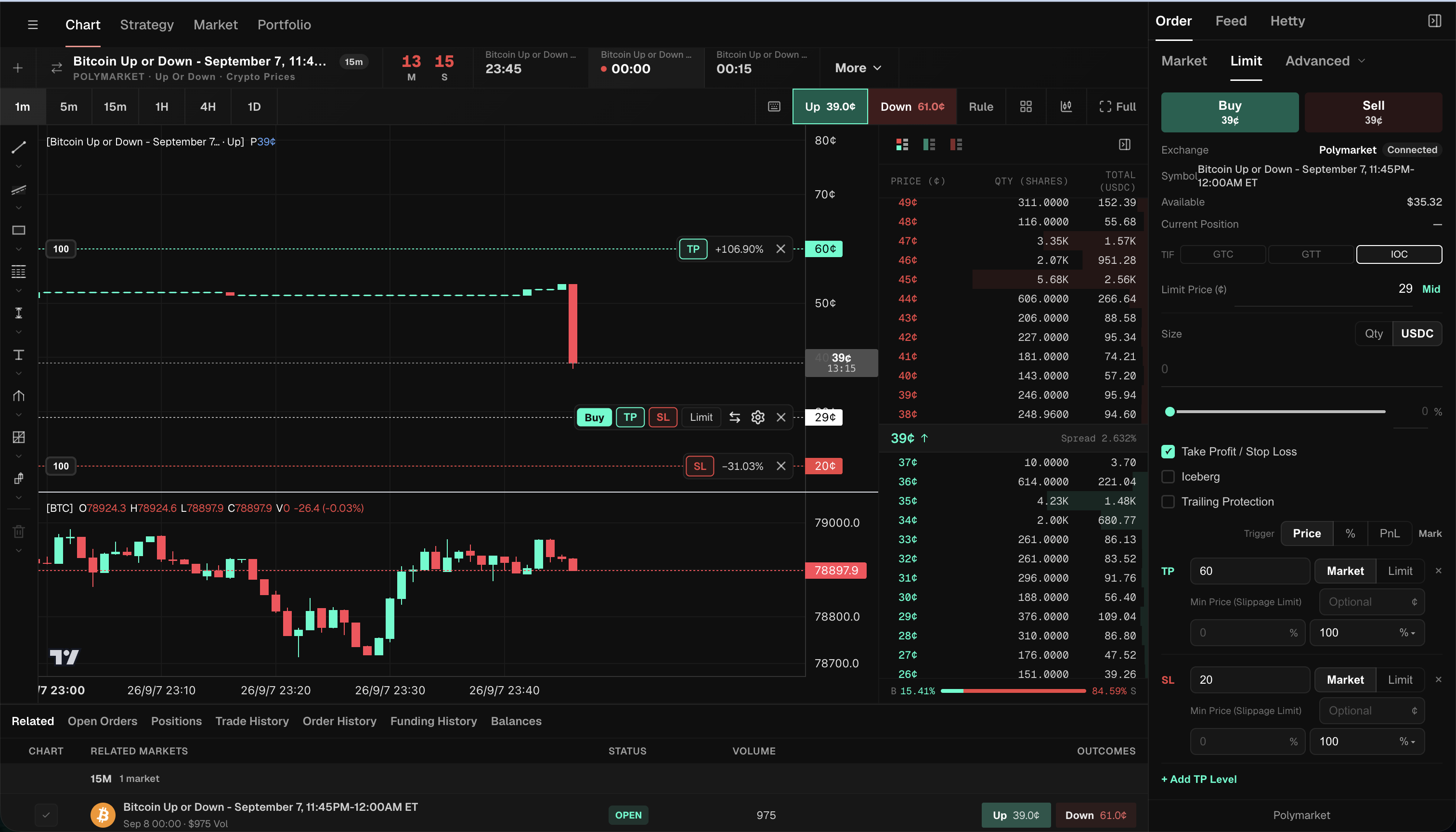
| Visible control | Example value | What to check |
|---|---|---|
| Selected outcome | Up | The exit must refer to the same outcome shares you intend to protect. |
| Entry price line | Buy at 29¢ | This is a configured entry value, not proof that a buy filled there. |
| Stop-loss line | SL at 20¢ | This is the downside trigger in the example, not a promised sale price. |
| Take-profit line | TP at 60¢ | This is a separate upside exit condition; see the take-profit guide. |
| SL execution | Market | Review the execution choice independently of the trigger. |
| Min Price (Slippage Limit) | Optional | A minimum acceptable sell price can restrict execution if bids disappear. |
To locate these controls in your own workspace, select Polymarket → market and outcome → Order → Take Profit / Stop Loss, then review the SL row. In Price mode, the value is the outcome-share price in cents. Choose Market or Limit separately and review the exit size before submitting.
The screen shows an entry-size field of 0 and no current position: these lines illustrate configuration, not submitted orders or realized returns.
The distinction matters especially on short-duration Up/Down markets, where the outcome price can change sharply. The underlying Bitcoin chart is useful context, but its dollar price is not the same value as a Polymarket share price in cents. Check which price the configured condition actually monitors.
Stop market vs stop limit on Polymarket: which should I use?
Choose the execution tradeoff separately from the trigger. “Market” prioritizes attempting an immediate match; “Limit” restricts the acceptable price. Neither choice guarantees an exit.
| Question | Stop Market | Stop Limit |
|---|---|---|
| What happens after the trigger? | An attempt to sell against available bids | A sell order with a specified minimum price |
| What is the main tradeoff? | Execution priority, with possible slippage | Price control, with possible non-execution |
| Can it remain partly or entirely unfilled? | Yes | Yes |
| What should you inspect? | Bid depth, any slippage guard and filled size | Limit price, remaining size and time in force |
For example, imagine an SL trigger at 20¢ while the next available bids are at 15¢. An immediate-execution exit might sell below the trigger if its price constraints allow it. A sell limit at 18¢ would not match those 15¢ bids. That leaves price protection intact but can leave the position open.
Trigger price vs limit price: what’s the difference?
The trigger price answers “when should the exit be submitted?” The limit price or a market-style exit’s slippage limit answers “what execution price is acceptable?” They have different jobs even when entered near one another in the ticket.
In the HeyTraders panel, TP and SL each have Market and Limit execution choices. A Market selection can still show an optional Min Price (Slippage Limit) field. Do not assume “Market” means there can be no price constraint.
Also separate the displayed chart price from the price available for your full position. Polymarket explains that its displayed price can be a midpoint or a last trade; an actual sale interacts with bids in the order book. A visible threshold is therefore not a quote for selling every share at that level. Source: Polymarket prices and order book.
What does Reduce Only do on a stop loss?
Reduce Only describes an exit constraint: an order should reduce existing exposure rather than add exposure. It is not protection against slippage, rejection or a stale position size.
For the attached TP/SL workflow, start by checking the selected outcome and exit quantity. If you have already sold part of the position manually, do not assume an old exit configuration still represents your intended remaining size. Review any Reduce Only option shown for the order type, the current holdings and other working exits together.
How do you attach a stop loss to a Polymarket position with Hey-Traders?
The illustrated order panel shows TP/SL attached while configuring an entry. Use it as a guide to the controls, not as evidence of an already-protected position:
- Connect Polymarket and choose the exact market and outcome. Check the market’s time window, not just a similar-looking title.
- Review the entry first. Confirm side, size, price and time in force. An unfilled entry is not a position you already hold.
- Enable Take Profit / Stop Loss. The panel exposes separate TP and SL settings.
- Choose the trigger mode. The screen offers Price, % and PnL. For this example, Price is selected and SL is entered as 20¢. Recheck the units whenever you switch modes.
- Choose SL execution and size. Review Market versus Limit, any minimum execution price, and the portion of the position to exit.
- Review the chart and ticket together, then submit only if the parameters are correct. A chart preview is still a preview.
- Verify the accepted state. Check the entry’s actual fills and the attached exit’s status. After a trigger, inspect filled quantity and remaining holdings, not just the chart label.
For existing holdings, use the position’s protection/order controls and confirm the actual size rather than submitting an unintended new Buy. The broader Polymarket trading terminal guide explains how market research, order-book selection and order entry fit together.
HeyTraders supports both Polymarket algo orders and custom Polymarket strategies in Paper and Live modes. The SL controls shown here configure an order-level exit. For conditions that decide when to enter a market, use the no-code Polymarket bot workflow to describe a rule, review its generated logic, and choose an execution mode separately.
How do I choose a stop level on a $0/$1 market?
There is no universal percentage that makes a stop safe. Consider why you entered, how much of a move would invalidate that reasoning, the spread, available bids and the time remaining before trading closes.
The distance from entry to stop is only a planned loss per share. Using the configuration above, 29¢ minus 20¢ is 9¢. That arithmetic assumes both an entry at 29¢ and an exit at 20¢; neither is proven by the screen. Actual losses can be larger because of slippage, fees or failure to exit. Size the position with that uncertainty in mind, including the possibility that the selected outcome becomes worthless.
Related automation on Polymarket
- Polymarket take profit: distinguish a resting sell limit from a conditional profit-taking exit.
- Polymarket trading terminal: inspect the chart, order book and order workflow in one place.
- Polymarket algo orders: explore the wider family of managed order types.
- Polymarket trailing stop: understand how a moving trigger differs from a fixed stop.
Risk note
Automation depends on the service, market data and exchange accepting the resulting order. Thin liquidity, fast moves and service interruptions can leave risk open. A successful submission is not a completed sale; Polymarket distinguishes order acceptance from execution in its order-placement documentation. Review status and remaining exposure. This guide is educational, not a recommendation to trade the illustrated market or use its settings.
Frequently Asked Questions
Does Polymarket have a native stop loss order?
Polymarket’s documented order-book API does not list a native stop-loss trigger. HeyTraders adds managed stop-loss algo orders: it monitors the configured condition and submits an exit order when that condition is met.
Is a stop market or stop limit better for a stop loss?
A stop market prioritizes attempting an immediate exit against available liquidity. A stop limit sets a minimum sell price but may remain unfilled. Neither guarantees that your position closes or that the loss stays within the planned amount.
Does the trigger price guarantee my exit price?
No. The trigger decides when to submit an exit, not its fill price. Liquidity, price limits, latency and order acceptance affect execution. A line on a chart is not evidence of a completed trade.
What is a good stop level on a binary Polymarket market?
There is no universal stop level. Consider the selected outcome, your reason for entering, spread, available bids, time to market close and position size. A stop is a risk-management instruction, not a guaranteed loss cap.
Can I use a Polymarket trading terminal to set stop loss and take profit together?
Yes. The HeyTraders order panel includes Take Profit / Stop Loss controls with separate TP and SL levels and Market or Limit execution choices. Review the submitted order state and remaining position afterward. These are paired order exits; starting a custom Paper or Live strategy is a separate action.
One last thing
Was this story helpful?
Your perspective helps us improve our guides.
No sign-in needed. An anonymous session remembers your response on this browser. Privacy
A little more perspective.
Polymarket Trading Strategy: How to Automate It
Combine outside data like weather forecasts or Binance prices with Polymarket order rules—then inspect the generated DSL before running it.
Polymarket Trading Terminals: How to Compare Your Options
Compare Polymarket terminals by the work you need to do: follow related markets, inspect the order book, prepare orders on a chart, and manage supported exit instructions.
Polymarket Trading Bots: How Automation Works and What to Watch
A Polymarket trading bot monitors markets and submits signed orders from predefined rules. Learn how the automation loop works, what you can automate, and where the real risks are.