Polymarket Take Profit: Set Exit Targets in a Trading Terminal
A resting sell limit and a conditional take-profit trigger are not the same thing. See how to plan profit-taking with the HeyTraders Polymarket terminal's TP/SL controls.
In this story
- Does Polymarket have a native take profit order?
- What is a take profit order on Polymarket?
- Polymarket take profit trading terminal: reading a real setup
- Take Profit Market vs Take Profit Limit: which should you use?
- How does the take profit trigger fire?
- What is Reduce Only and why does it matter?
- Can you pair a take profit with a stop loss (OCO)?
- How to set a take profit on Polymarket with Hey-Traders
- Risk note
- Frequently Asked Questions
You can take profit on Polymarket with a resting sell limit—you do not need a separate trading terminal simply to sell at a target price. A conditional take-profit order is a different workflow: it waits for a monitored condition and then submits an exit. HeyTraders adds that managed TP/SL workflow to its Polymarket trading terminal, alongside the chart and order book.
This guide focuses on choosing between those approaches, reading the take-profit controls and checking whether a target actually became a filled trade. For the downside exit, use the companion Polymarket stop loss guide. The video above demonstrates the HeyTraders TP/SL workflow.
Does Polymarket have a native take profit order?
The answer depends on what you mean by “take profit.”
- A sell limit at a favorable price: supported by the native order book. It can rest until another trader matches it, it expires or you cancel it.
- A separate trigger that submits an exit later: this is the conditional behavior managed by an automation layer such as HeyTraders.
For example, if you already own shares bought at 29¢, a sell limit at 60¢ can serve as a profit target. It does not need to wait for an external trigger before entering the book. Polymarket describes resting orders and their lifetimes in its limit-order documentation.
Do not select an automation product based on the mistaken idea that native limit orders cannot take profit. The useful question is whether you need conditional execution, paired downside protection or a more integrated order-management workflow.
What is a take profit order on Polymarket?
In this guide, take profit refers to the conditional instruction: when the monitored outcome price reaches your favorable threshold, submit a sell for the configured size.
An outcome share is not the underlying asset. In a Bitcoin Up/Down market, a TP value of 60¢ refers to the selected outcome share, not a Bitcoin price of $60. Also, selling Up shares closes or reduces Up exposure; buying Down shares is a separate trade.
There are two decisions to make: when to request the exit, and how to execute it. That is why the TP row has a target value and a separate Market/Limit choice.
Polymarket take profit trading terminal: reading a real setup
The HeyTraders configuration example shows an Up-market ticket with Buy at 29¢, TP at 60¢ and SL at 20¢. Treat these as example settings, not a recommendation or a record of successful trading.
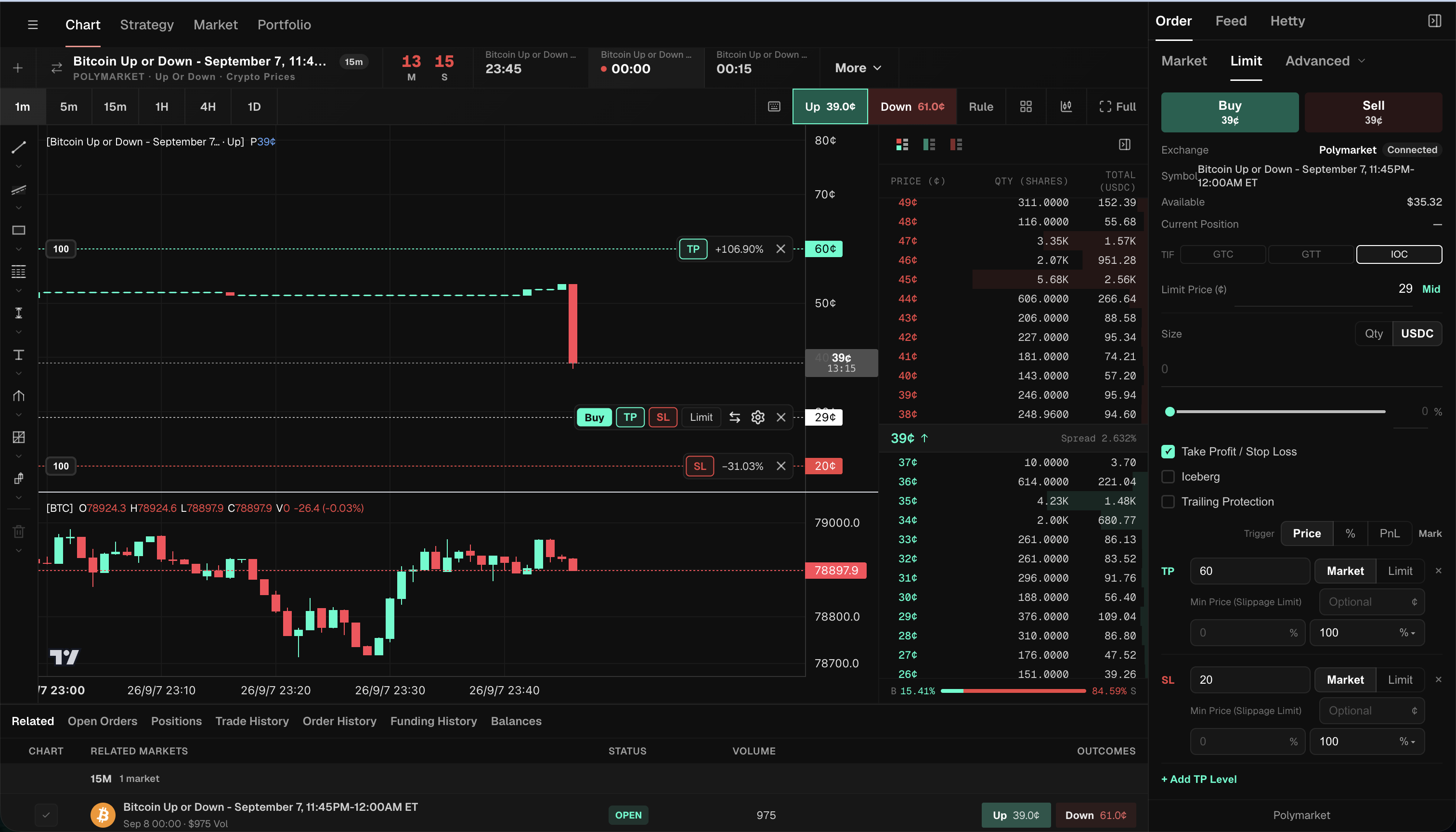
| Part of the setup | What the example shows | Why it matters for profit-taking |
|---|---|---|
| Entry line | Buy at 29¢ | This is the configured reference; actual cost depends on entry fills. |
| TP line | TP at 60¢, above the 29¢ entry reference | This is the favorable trigger, not a guaranteed execution price. |
| TP execution | Market selected, Limit available | Target selection and execution choice are separate decisions. |
| TP size | 100% in the displayed row | Check what quantity the percentage represents before submitting. |
| Add TP Level | A control below the TP/SL rows | Additional target levels require a deliberate allocation of exit size. |
| SL line | SL at 20¢, below the 29¢ entry reference | Downside protection is a separate condition, not an additional profit target. |
The difference between the configured 29¢ entry and 60¢ target is 31¢ per share before costs, if both filled at those values. This is illustrative arithmetic, not evidence of realized profit. The screenshot does not establish that either order was submitted or filled; it displays a current quote of 39¢, an entry-size field of 0 and no current position. The +106.90% chart label describes the configured price difference, not an earned return.
To try this workflow, open Order → Take Profit / Stop Loss, select the trigger units, and set the TP row. Review Market/Limit and the exit percentage independently. Add TP Level lets you prepare more than one target; review the combined allocation rather than assigning the whole position to every row.
For the rest of the workspace, see the Polymarket trading terminal guide. The target configuration is the feature demonstrated here—not an earned return.
Take Profit Market vs Take Profit Limit: which should you use?
The tradeoff is execution priority versus a minimum acceptable sale price—not guaranteed profit versus no profit.
| Question | Take Profit Market | Take Profit Limit |
|---|---|---|
| After the condition is met | Attempts an immediate sale against available bids | Submits a sell with a specified limit price |
| Main control | Execution choice and any slippage guard | Minimum sale price and order lifetime |
| Main risk | A worse fill than the displayed target, or no complete fill | Remaining unfilled if buyers do not meet the limit |
| What counts as success? | Confirmed filled size at acceptable prices | Confirmed filled size at acceptable prices |
The HeyTraders Market TP row can show an optional Min Price (Slippage Limit). A tighter minimum can reject prices you do not want, but may also prevent an exit. Switching to Market is not a promise that the whole position will close.
A conditional limit order can match immediately if its price is marketable; it does not always have to rest first. Polymarket explains the distinction between resting and marketable orders in its order lifecycle.
How does the take profit trigger fire?
For shares you own, the TP condition usually watches for a rise in the selected outcome price. The configured trigger must be checked against the appropriate price source and units.
The practical sequence is:
- Configure the instruction. Choose the outcome, TP value, execution choice and exit size.
- Verify acceptance. Confirm that the entry and attached protection are in the expected states; a draft line is not an active order.
- Monitor the condition. The managed instruction waits for its configured threshold.
- Inspect the resulting exit. A triggered instruction still needs an accepted, filled sell to reduce exposure.
- Reconcile the position. Compare filled size, remaining holdings and any other exit instructions.
Displayed prices and executable bids are not interchangeable. A headline price or chart touch does not establish that sufficient buyers existed for your full size. Source: Polymarket prices and order book.
What is Reduce Only and why does it matter?
Reduce Only describes an instruction to reduce existing exposure rather than add it. It is not a guarantee of a fill or of profit after costs.
In the paired TP/SL workflow, the key review is the relationship between your current holdings and the exit quantity. If you sold part of the position elsewhere, revisit the remaining TP size. If you add multiple TP levels, check their allocation together rather than assuming that every row should sell the entire original position.
The screenshot shows a 100% size setting for one TP row; it does not demonstrate how several levels would fill. Review the order preview and accepted state for the configuration you actually submit.
Can you pair a take profit with a stop loss (OCO)?
Yes. HeyTraders includes paired TP/SL controls for Polymarket algo orders. For an existing long outcome position, a typical bracket places TP above the entry reference and SL below it.
OCO means One-Cancels-the-Other, but do not treat that name as evidence that both sides have already finished updating. A trigger, a partial fill and a confirmed cancellation are different events. After one leg executes, inspect the remaining position and the other leg’s actual status. Do not assume two independently created sell orders are automatically linked.
For the downside condition and its execution tradeoffs, see stop loss on Polymarket. If you are exploring different exit behavior, the trailing-stop guide covers a moving threshold rather than a fixed TP target.
How to set a take profit on Polymarket with Hey-Traders
The example shows TP/SL being configured alongside a new entry. For that workflow:
- Connect Polymarket and select the market and outcome. Confirm the specific time window and share you intend to buy.
- Review the entry. Side, size, price and time in force determine the entry instruction. TP does not make an unfilled Buy into an existing position.
- Enable Take Profit / Stop Loss. Choose Price, % or PnL, checking the units. The illustrated Price-mode TP is 60¢.
- Choose Market or Limit execution for TP. Review any minimum price or limit price independently of the target.
- Set the exit size. If using Add TP Level, review the sizes across all levels. Do not copy the example’s 100% blindly into every row.
- Review the SL leg separately. Confirm its value and execution choice if you include downside protection.
- Submit after reviewing, then check the accepted order state. Later, use fills and remaining holdings to determine what actually executed.
For shares you already hold, use the position’s protection/order controls rather than unintentionally creating another entry. HeyTraders supports these Polymarket algo orders alongside custom Polymarket strategies in Paper and Live modes. If you want a bot to evaluate entry conditions as well as an exit plan, follow the Polymarket trading bot guide; configuring TP/SL does not itself start that strategy.
Risk note
An unrealized gain can disappear before an exit fills. Liquidity, price constraints, fees, market closure and service interruptions matter. TP/SL values are instructions, not promised outcomes. This article explains the controls; it does not recommend the pictured market, prices or position size.
Frequently Asked Questions
Does Polymarket have a built-in take profit order?
You can take profit with a normal resting sell limit on Polymarket. A separate conditional take-profit trigger is different: HeyTraders manages that condition and submits the selected exit when it is met. You do not need a trading terminal just to place a sell limit.
What is the difference between Take Profit Market and Take Profit Limit?
Take Profit Market attempts an immediate exit against available bids after the trigger, subject to execution constraints. Take Profit Limit sets a minimum sell price but may remain unfilled. Neither guarantees a complete exit.
Is the take profit trigger price the price I will get?
No. The trigger is the condition for submitting the order, not a fill confirmation. The resulting sale depends on available bids, size and execution constraints. Profit is realized only on shares actually sold, after accounting for costs.
What does Reduce Only do on a take profit order?
Reduce Only is an instruction to reduce existing exposure rather than add it. It does not guarantee a fill or profit. Check the selected outcome, remaining holdings, exit quantity and other working orders before relying on a take-profit setup.
Can I combine a take profit and a stop loss on Polymarket?
Yes. HeyTraders has paired TP/SL controls for Polymarket algo orders. Review the remaining quantity and the other leg’s status after any fill or cancellation; a triggered leg is not proof that everything has closed. Paired TP/SL is an order-level workflow; custom Paper or Live strategies are configured separately.
One last thing
Was this story helpful?
Your perspective helps us improve our guides.
No sign-in needed. An anonymous session remembers your response on this browser. Privacy
A little more perspective.
Polymarket Trading Strategy: How to Automate It
Combine outside data like weather forecasts or Binance prices with Polymarket order rules—then inspect the generated DSL before running it.
Polymarket Trading Terminals: How to Compare Your Options
Compare Polymarket terminals by the work you need to do: follow related markets, inspect the order book, prepare orders on a chart, and manage supported exit instructions.
Polymarket Trading Bots: How Automation Works and What to Watch
A Polymarket trading bot monitors markets and submits signed orders from predefined rules. Learn how the automation loop works, what you can automate, and where the real risks are.