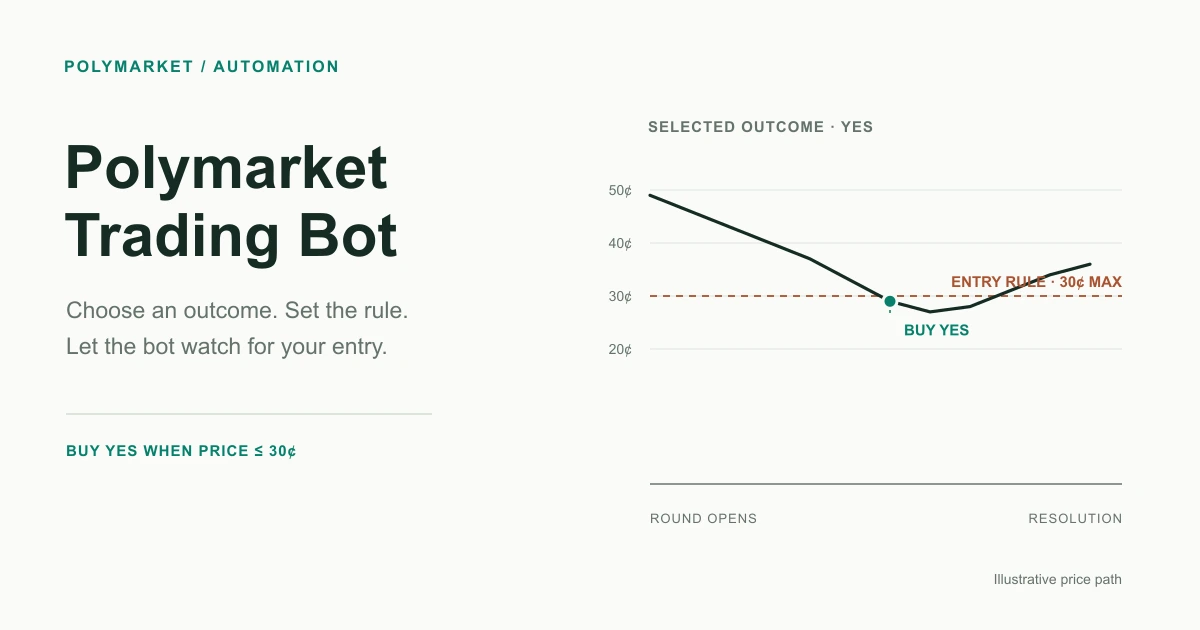
How to Build a Trading Bot Without Coding
Describe a trading rule, inspect the generated strategy, and review a real HeyTraders backtest workspace before choosing paper or live execution.
In this story
- Build a trading bot without coding: start with a testable brief
- What is a no-code trading bot?
- What can you actually automate without code?
- How do you build a no-code trading bot step by step?
- What should you check before going live?
- Which venues and markets can a no-code bot trade?
- Is no-code automated trading safe?
- Frequently Asked Questions
A no-code trading bot lets you describe a trading strategy in plain English and have the platform produce executable rules. HeyTraders connects that authoring step to historical backtesting and separate Paper or Live Trading choices on supported venues. You do not need to write the implementation yourself, but you still need to review the rules and authorize any real-money execution.
Build a trading bot without coding: start with a testable brief
Instead of asking “make me a profitable crypto bot,” specify what you want the strategy to observe and do. An example brief is:
Test an EMA trend idea across BTC/USDT, ETH/USDT, SOL/USDT, XRP/USDT and DOGE/USDT on a supported perpetual-futures venue. Use completed one-hour candles for the signal and evaluate execution every minute. Before running, show me the entry, exit and position-sizing rules and ask me to confirm the historical dates and costs.
This is an illustrative starting prompt, not the recorded input for the screenshot below. The actual HeyTraders screen shows the kind of output to review: multiple charts, the strategy’s script, saved backtest runs and settings.
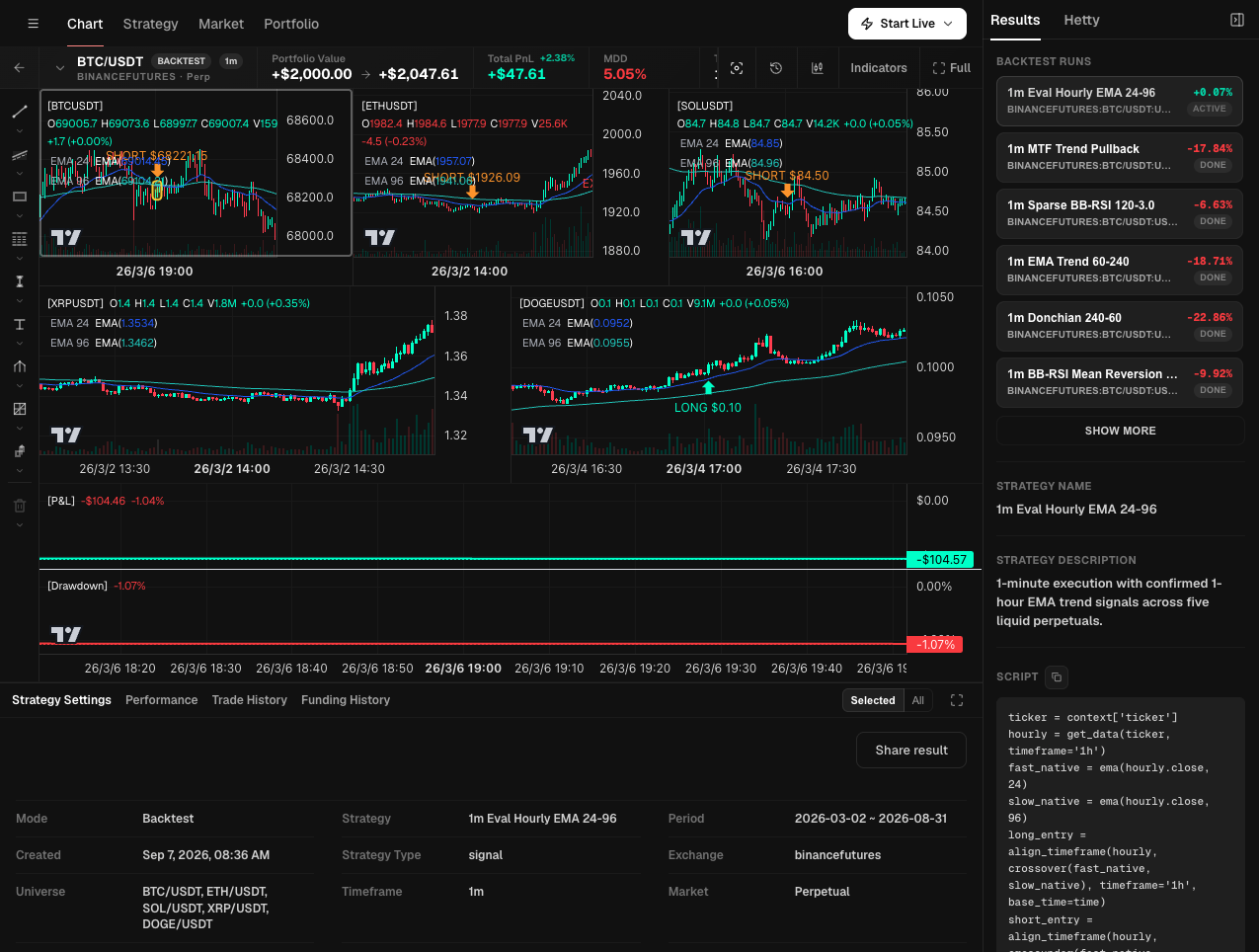
Your first task is not to press Start Live. Check the interpreted rule, confirm the test settings, and inspect a trade from the selected run. The AI backtesting guide explains that review in detail.
What is a no-code trading bot?
A no-code trading bot is software that turns a plain-language strategy description into automated trading actions without requiring you to program. Instead of writing Python or configuring APIs manually, you state your entry, exit, and risk rules in words, and the platform handles the technical execution.
Traditionally, building a bot meant learning a language, connecting exchange APIs, handling authentication, and debugging order logic. No-code platforms remove that barrier. On Hey-Traders, you type a strategy such as “buy when the 20-day moving average crosses above the 50-day, take profit at 8%, stop loss at 4%,” and the AI translates it into executable code you can test and deploy. To go deeper on the underlying discipline, see our guide to what algorithmic trading is.
What can you actually automate without code?
You can describe signal generation, entries, exits, position sizing and risk rules without writing their implementation. Whether a rule can run depends on available data, the generated strategy and the selected execution mode. A clear sentence is a specification to validate, not proof that every requested feature is supported.
Common things traders automate:
- Entries and exits based on indicators (moving averages, RSI, breakouts) or price levels.
- Risk management such as stop losses, take profits, and trailing stops that follow price by a set delta.
- Structured order strategies like grid trading that ladders buys and sells across a range.
- Execution algorithms such as TWAP and VWAP that split large orders over time to reduce impact.
- Conditional logic that only acts when several rules are true at once.
These are categories of automation, not a promise that every order type works inside every strategy on every venue. Review the generated rules and enabled controls for your actual account. A trigger activates an instruction; it does not guarantee the fill price. See order types in the docs for the order-level concepts.
How do you build a no-code trading bot step by step?
On venues with historical-testing support, the conceptual flow has five stages: describe, convert, backtest, review, and deploy. You write the strategy in plain English, the AI generates the logic, you test it on historical data, evaluate the metrics, and only then enable live signals or automated execution. Polymarket uses the Paper/Live workflow below rather than this historical-backtest step.
- Describe the strategy. State your entry, exit, position size, and risk rules in plain language. Clarity matters more than jargon. Our primer on natural-language trading shows how to phrase rules well.
- Convert to executable logic. The AI translates your words into runnable code, so you skip programming and API wiring entirely.
- Backtest on historical data. Run the strategy against past market data to see how it would have behaved. Learn the method in how to backtest a trading strategy.
- Review professional metrics. Evaluate the Sharpe ratio, maximum drawdown, and win rate alongside the equity curve before risking capital.
- Choose the next execution mode separately. For eligible strategies, review Paper Trading first. Live Trading requires a supported connected account, the necessary permissions and explicit confirmation.
What should you check before going live?
Before automating real money, confirm the strategy is robust, the risk controls are correct, and you understand the venue and order behavior. Backtested results do not guarantee future performance, so treat live deployment cautiously and start small.
| Check | Why it matters |
|---|---|
| Backtest across different market regimes | A strategy that only works in an uptrend may fail in a range or downtrend. |
| Maximum drawdown you can tolerate | MDD shows the worst peak-to-trough loss; make sure it fits your risk appetite. |
| Stop loss and position sizing | Defined risk per trade protects against a single bad move. |
| Order type behavior | Triggers are thresholds, not guaranteed fills; slippage can occur in fast markets. |
| Venue and permissions | Confirm the market is supported and that you have granted only the access you intend. |
Which venues and markets can a no-code bot trade?
Use the account and venue choices available for the strategy and execution mode you intend to use. A visible market chart or exchange logo does not establish live-strategy eligibility. The example above is labeled Binance Futures / Perpetual in Backtest mode; it is not proof that a real account is connected or that Live Trading is enabled.
Polymarket is supported in Paper and Live modes. HeyTraders also provides order-level algo controls, including stop loss, take profit and supported trailing stops. Those controls and a custom strategy are different workflows. Historical Polymarket backtesting is not currently supported; the screenshot above is a crypto-futures historical test, not a Polymarket test. For crypto derivatives, see perpetual futures.
Build a no-code Polymarket bot by chatting with Hetty
Start with the specific Polymarket market and outcome you want to trade. Describe the data to observe, the condition for an entry, the order size and when the bot should stop adding exposure. Hetty turns that brief into Signal DSL you can review rather than asking you to build and host an API client.
Check that the generated rule targets the intended outcome and uses the units you specified. Then choose Paper to observe simulated execution on incoming data, or Live after reviewing the connected account, permissions and confirmation. Drafting a rule is not an execution authorization.
The Polymarket bot overview explains how this differs from advanced orders. For a more detailed walkthrough, use the no-code Polymarket strategy tutorial.
Unlike the historical crypto-futures test earlier in this article, this example is a Polymarket strategy in Paper mode. Compare the chat brief with the visible description and Script, and confirm Paper in the workspace before interpreting any result.
Paper workflow
From a chat request to a Paper workspace
Two actual HeyTraders screens show the trading brief, visible Paper status and generated rules to inspect before considering Live.
Use the controls or arrow keys. On a touch screen, swipe left or right.
-
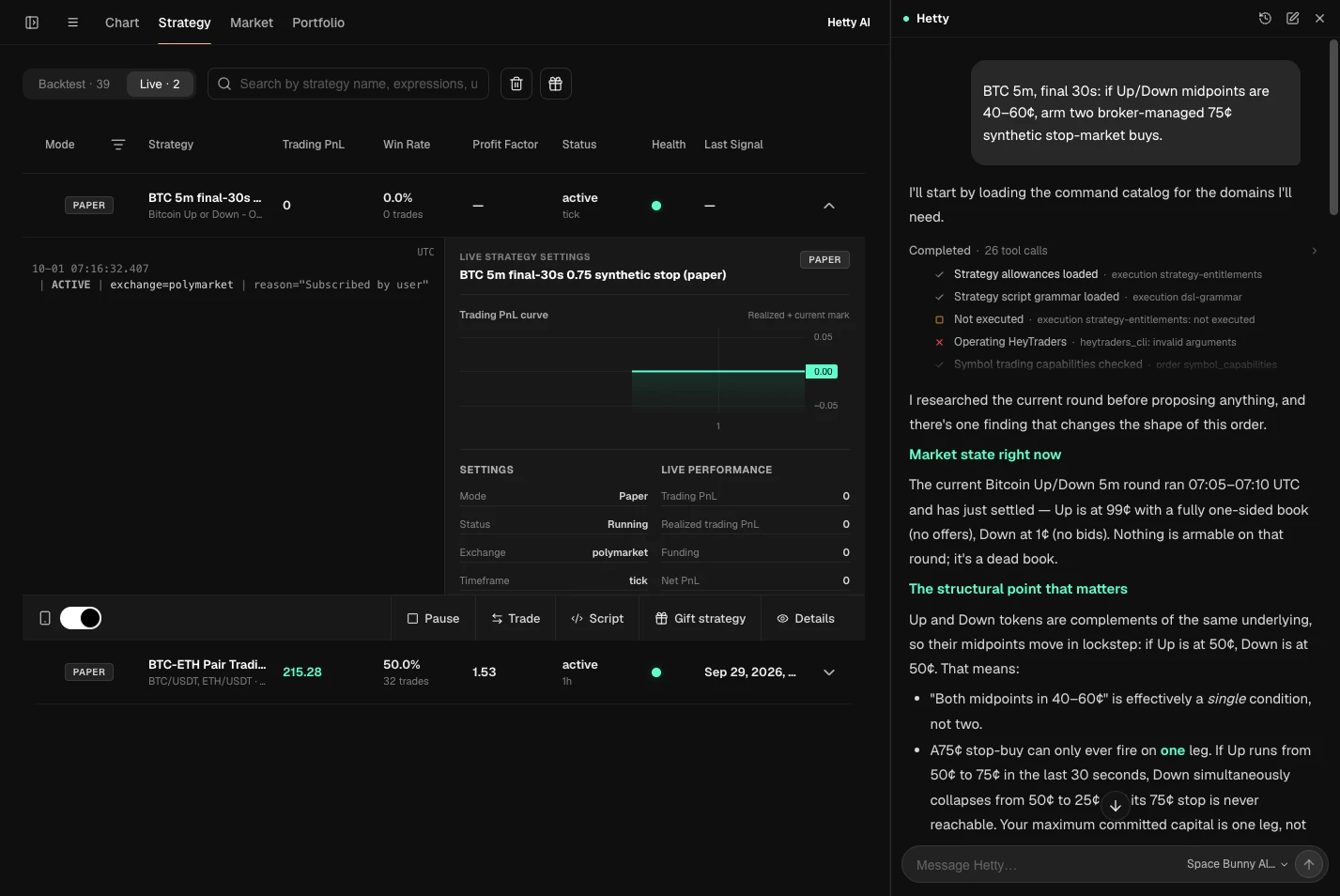
The chat contains a plain-language trading brief. The expanded Polymarket strategy is marked Paper, active and Running, with zero trades and zero Trading PnL at capture. Open full-size screenshot (new tab) -
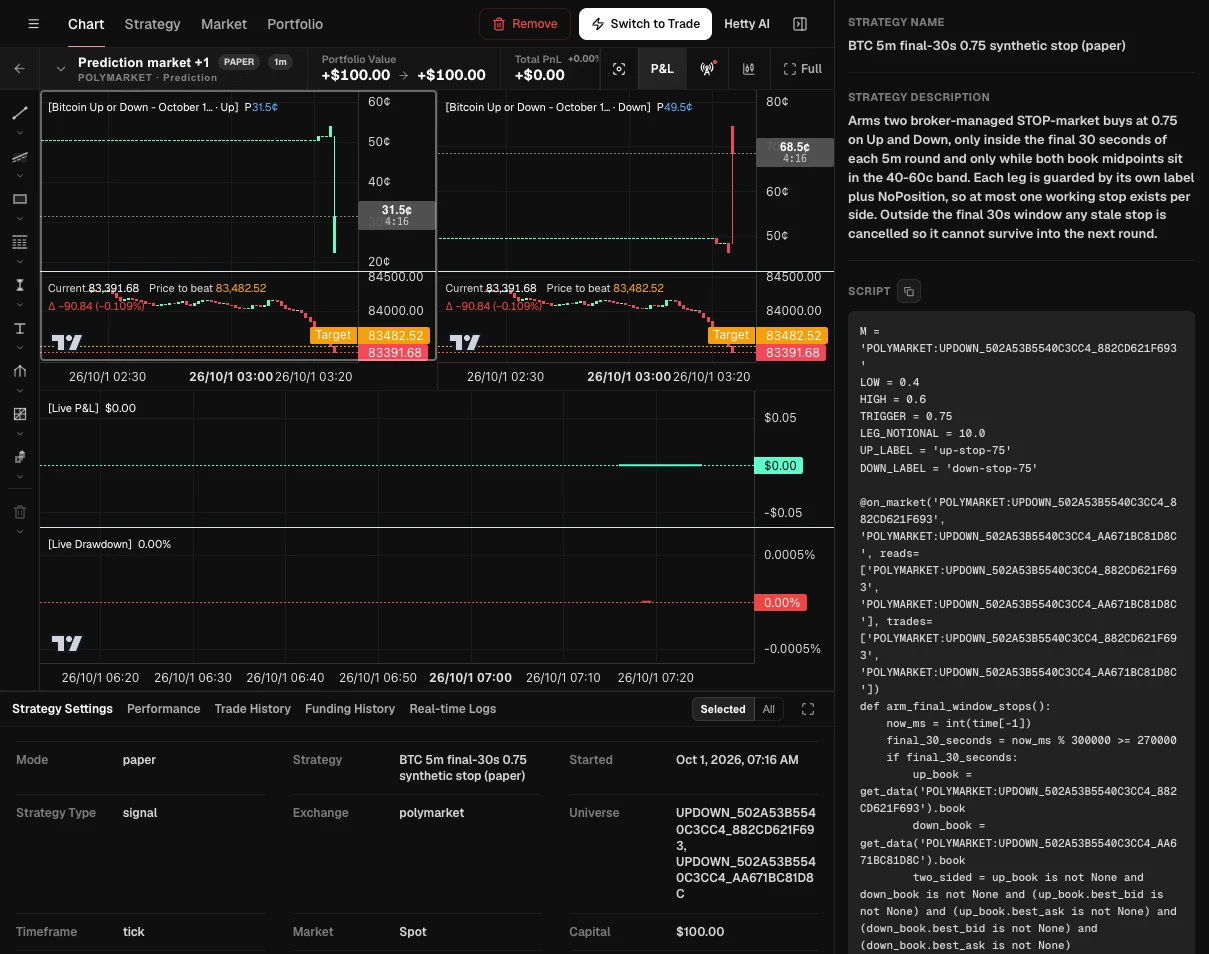
The Paper badge, strategy description, Script panel and settings are visible together. The selected strategy shows $100 of simulated capital and $0 P&L, not a real-money performance result. Open full-size screenshot (new tab)
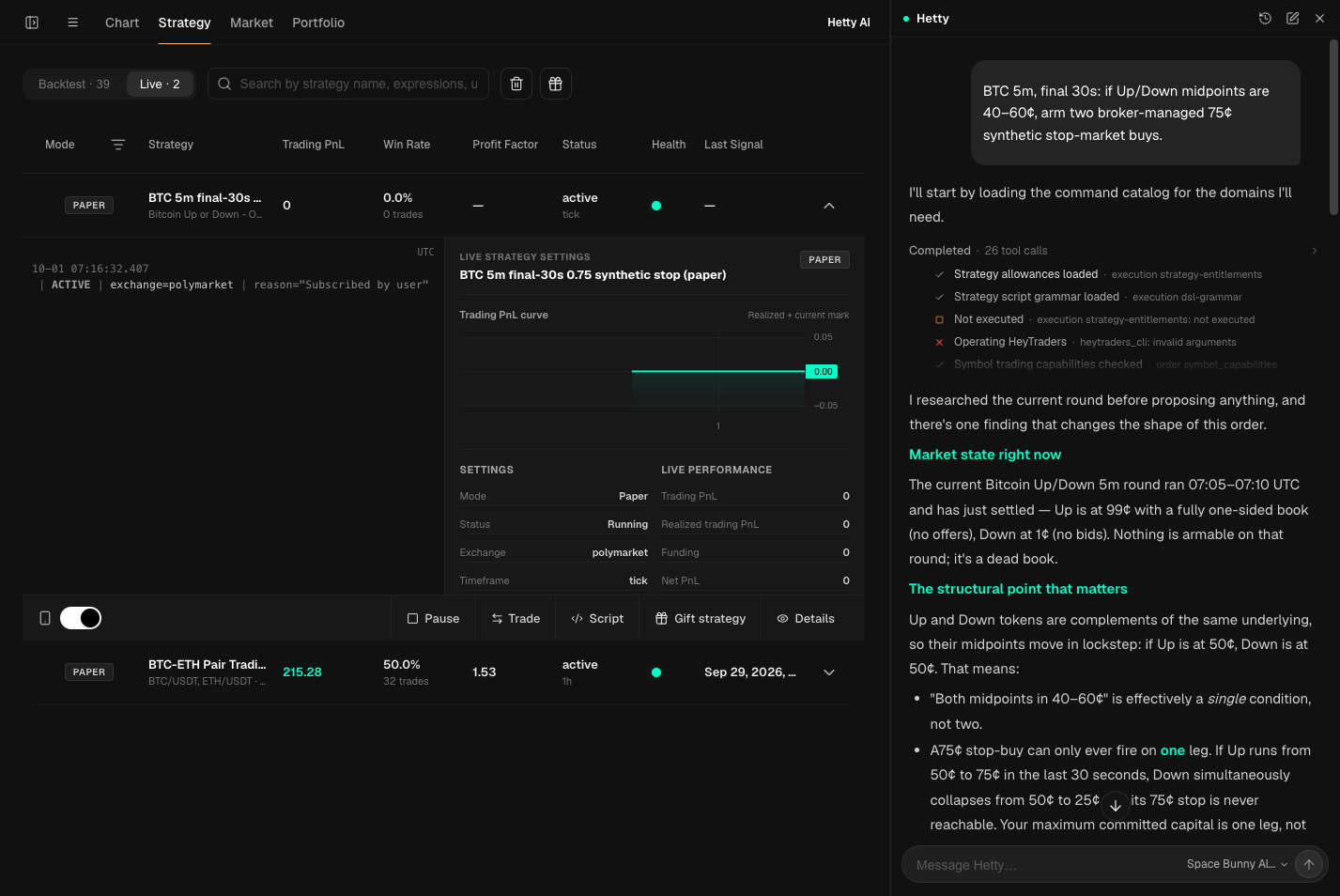
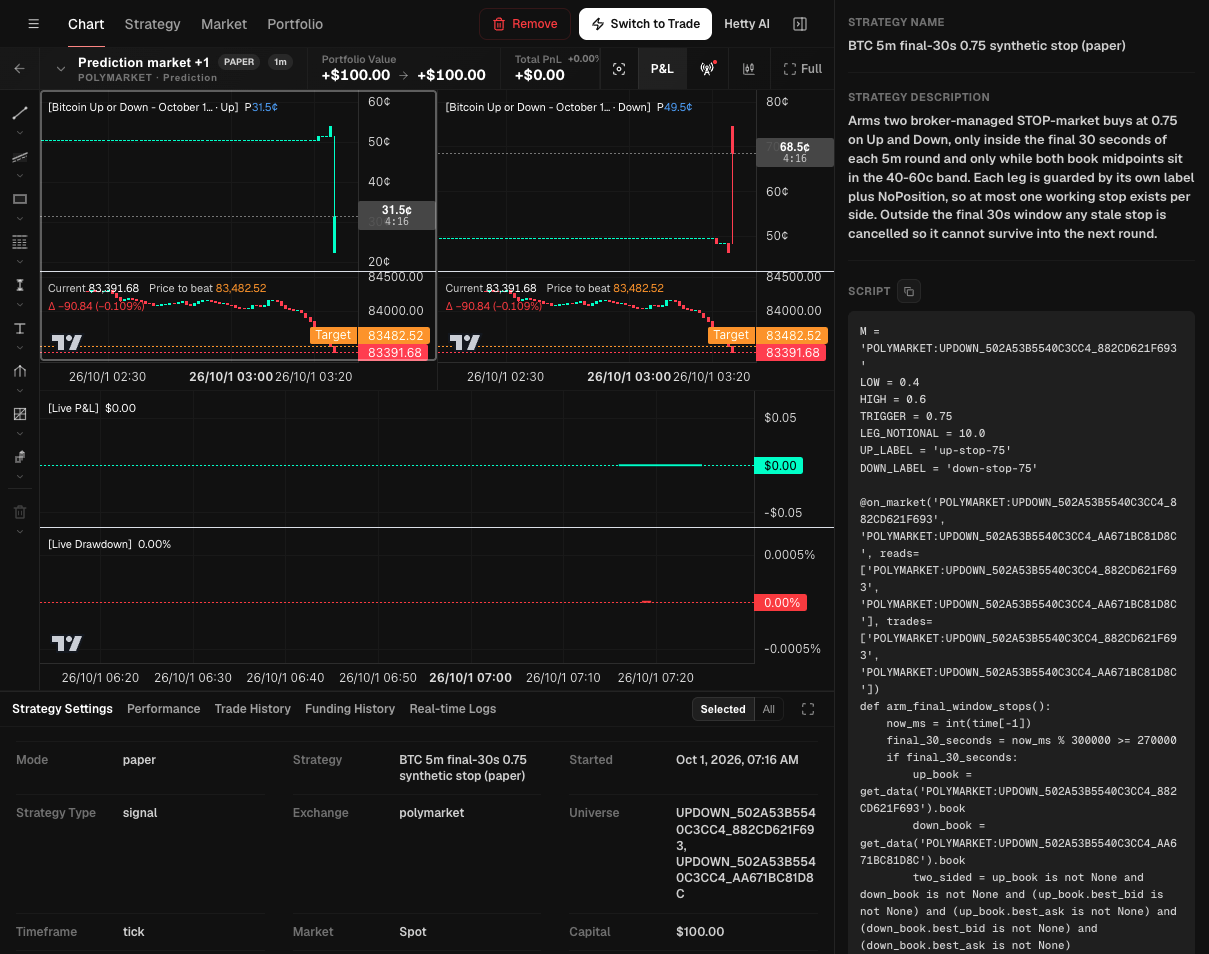
Runtime screenshots supplied on October 1, 2026. Paper uses simulated capital and incoming market data, not historical backtesting. These captures do not establish filled orders or profitability. Other strategies listed in the first screen are not results of this example; intermediate chat diagnostics remain unchanged.
Is no-code automated trading safe?
No-code automation can reduce manual implementation work; it does not eliminate coding errors, mistaken assumptions or execution failures. Trading still involves risk of loss, and leverage amplifies that risk. The tool makes strategies accessible, not automatically correct or profitable.
Practical safeguards:
- Review Paper Trading for an eligible strategy before considering real execution.
- Use stop losses and sensible position sizing on every strategy.
- Understand that backtested results do not guarantee future performance.
- Grant only the trading permissions you actually need, and review them regularly.
Automating a strategy does not make it profitable. Testing helps evaluate an idea, and risk controls help manage exposure; neither guarantees a profit.
Frequently Asked Questions
Do I need any coding experience to build a trading bot?
You do not have to write the strategy implementation yourself. HeyTraders can turn a plain-English description into executable rules. You still review those rules and, for real trading, connect an eligible account and grant the required permissions.
Can a no-code bot backtest my strategy?
Yes, where historical testing is supported. You can review settings, individual trades and performance metrics before deciding whether to proceed to Paper or Live. Polymarket strategies currently use Paper or Live with incoming data rather than historical backtesting.
Will the bot execute trades automatically?
Only after you choose and authorize an execution mode. HeyTraders supports Polymarket strategies in Paper and Live modes alongside separate order-level algo controls. Live execution requires an eligible connected account, the required permissions and confirmation. Creating a strategy does not start it.
Does a trigger price guarantee my order fills at that price?
No. A trigger price is a threshold that activates an order, not a guaranteed fill. Market fills execute against available liquidity and can differ from the trigger, especially in fast-moving markets.
Is automated trading risk-free?
No. No-code tools can reduce manual implementation work, but generated rules and automation can still contain mistakes. Trading can lose money, leverage amplifies risk, and backtested results do not guarantee future performance.
One last thing
Was this story helpful?
Your perspective helps us improve our guides.
No sign-in needed. An anonymous session remembers your response on this browser. Privacy
A little more perspective.
Natural Language Trading: Describe a Strategy in Plain English
Natural language trading turns a plain-English strategy description into executable code, a backtest, and live signals — no coding required. Here is how it works.
AI Trading Explained: How It Works, End to End
How AI trading works end to end: from a plain-English idea to AI-generated strategy, backtest, and live signals — plus what AI can and cannot do, and the risks.
Polymarket Trading Strategy: How to Automate It
Combine outside data like weather forecasts or Binance prices with Polymarket order rules—then inspect the generated DSL before running it.