Polymarket Trading Bots: How Automation Works and What to Watch
A Polymarket trading bot monitors markets and submits signed orders from predefined rules. Learn how the automation loop works, what you can automate, and where the real risks are.
In this story
- Polymarket automation you can configure in HeyTraders
- What is a Polymarket trading bot?
- How does a Polymarket trading bot work?
- Does Polymarket support automated trading?
- What can you automate on Polymarket?
- Full API bot, trading terminal, or strategy automation?
- What makes a bot reliable enough to run unattended?
- What are the main risks of Polymarket bots?
- How to make a Polymarket bot: when you want to build your own API integration
- Polymarket automation launch checklist
- Frequently Asked Questions
A Polymarket trading bot is software that monitors Polymarket data and submits orders when predefined rules are met. It can watch markets continuously and manage entries and exits. It cannot predict an outcome, guarantee a fill, or make an unprofitable strategy profitable. Developers can build a programmable bot with Polymarket’s official APIs. HeyTraders also lets traders create custom Polymarket strategies without building an API client, and offers separate order-level algo controls in the trading terminal.
This guide explains the bot loop — data, decision, execution, and monitoring — and distinguishes custom strategy automation from order-specific controls such as take profit and stop loss.
HeyTraders product scope: Custom Polymarket strategies can run in Paper or Live mode using current market data. Order-level algo instructions are a separate workflow in the trading terminal.
Polymarket automation you can configure in HeyTraders
HeyTraders supports two distinct Polymarket automation workflows:
- Custom strategy bots: Describe market conditions and entry rules to Hetty, review the generated Signal DSL, and choose Paper or Live.
- Algo orders: Attach supported take-profit, stop-loss, or other trigger instructions to an individual order in the trading terminal.
For a no-code Polymarket bot, start in the HeyTraders trading terminal and describe your idea to Hetty. Specify the market and outcome, the data or price condition to monitor, the entry size, and the intended execution mode. Review the generated Signal DSL against that brief, then choose Paper or Live separately. Live execution requires an eligible connected account and your confirmation; writing the prompt does not authorize a trade.
This is the overview of how bots work. The hands-on Polymarket strategy tutorial goes deeper into chat-based creation and example rules. Historical Polymarket backtesting is not currently supported; Paper evaluates incoming data with simulated execution rather than replaying historical trades.
The two screens below show a custom Polymarket strategy in Paper: its chat brief and active status, then its charts and generated Script. Review the interpreted timing, prices and position size rather than treating a running status as proof of a successful trade.
Paper workflow
From a chat request to a Paper workspace
Two actual HeyTraders screens show the trading brief, visible Paper status and generated rules to inspect before considering Live.
Use the controls or arrow keys. On a touch screen, swipe left or right.
-
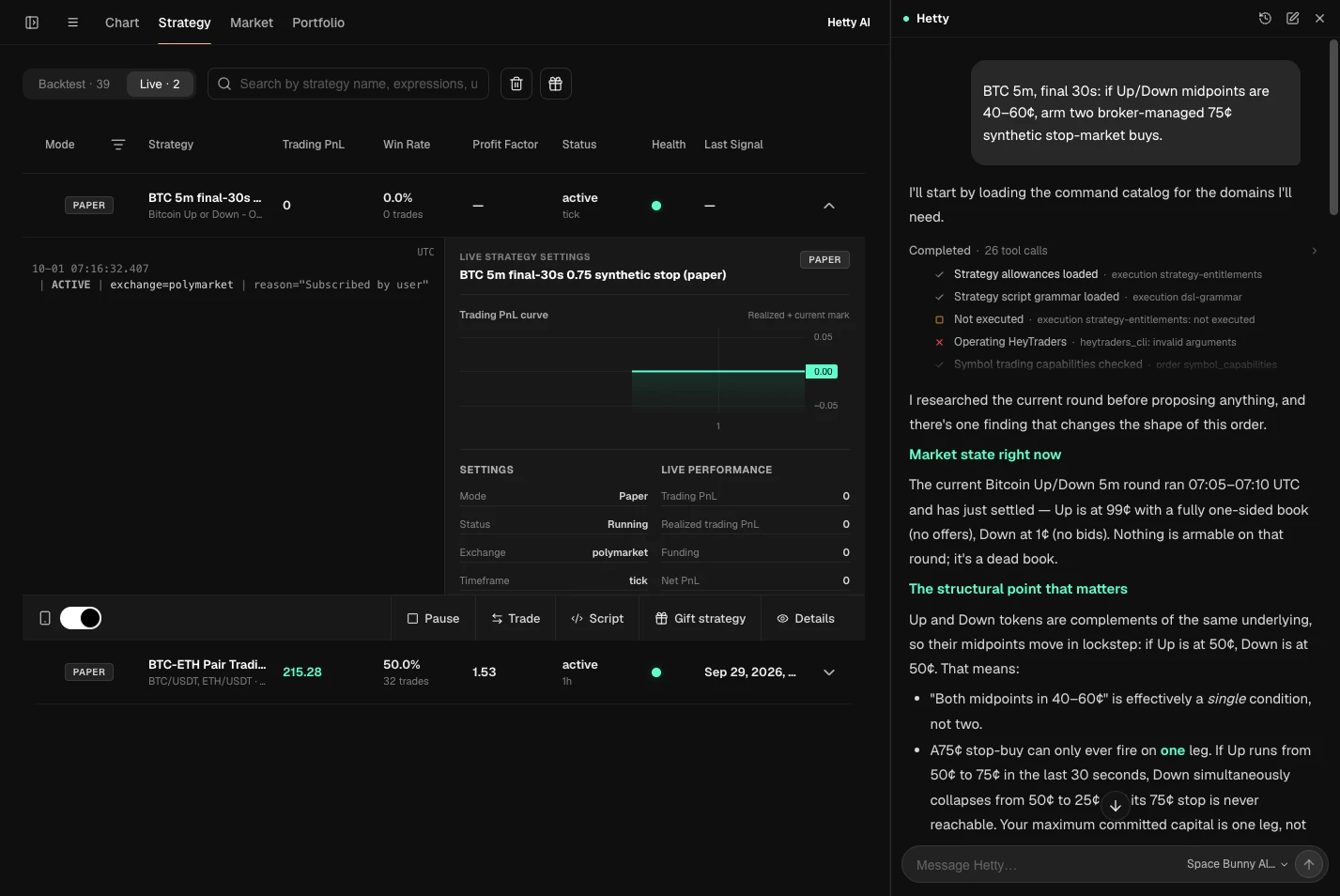
The chat contains a plain-language trading brief. The expanded Polymarket strategy is marked Paper, active and Running, with zero trades and zero Trading PnL at capture. Open full-size screenshot (new tab) -
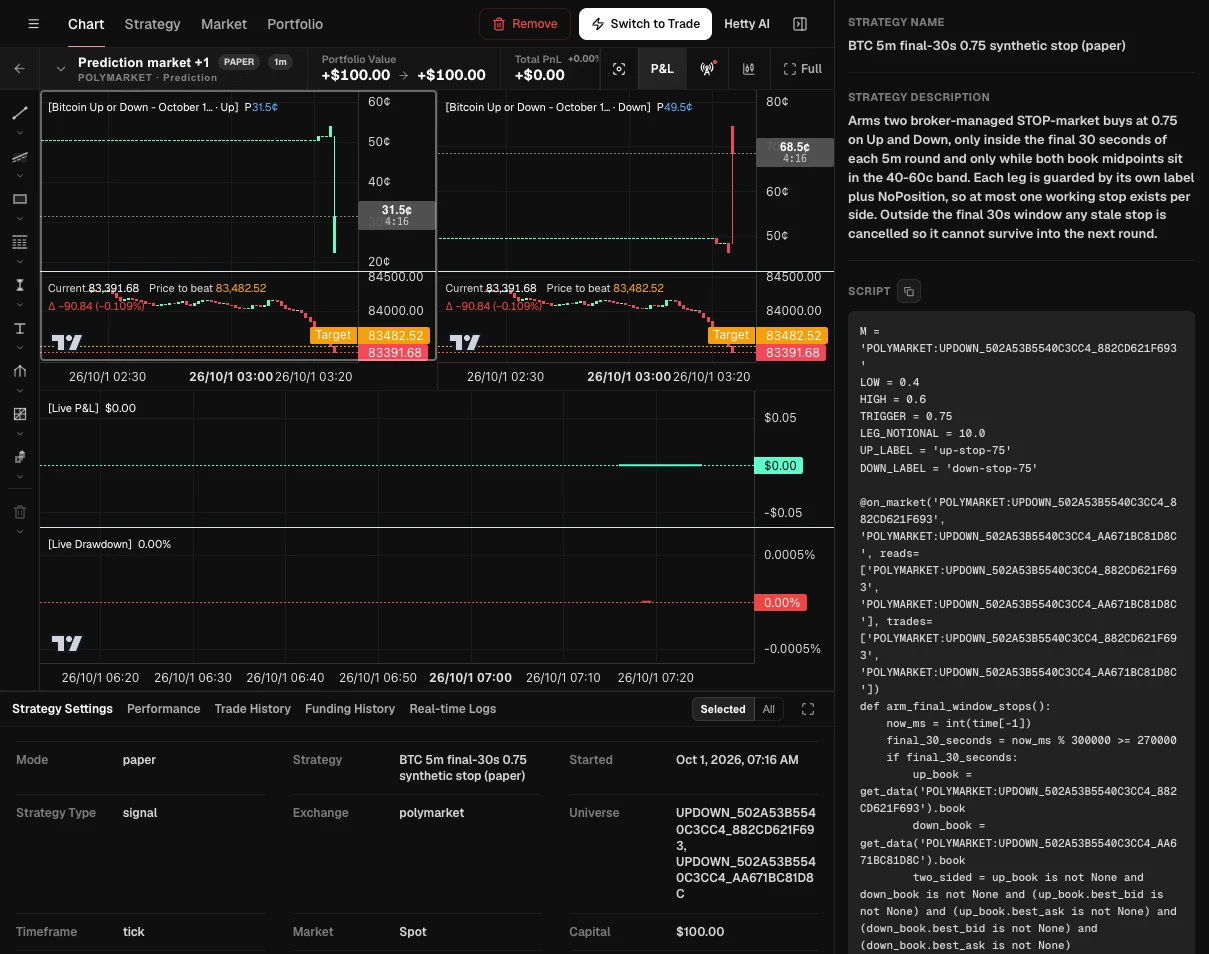
The Paper badge, strategy description, Script panel and settings are visible together. The selected strategy shows $100 of simulated capital and $0 P&L, not a real-money performance result. Open full-size screenshot (new tab)
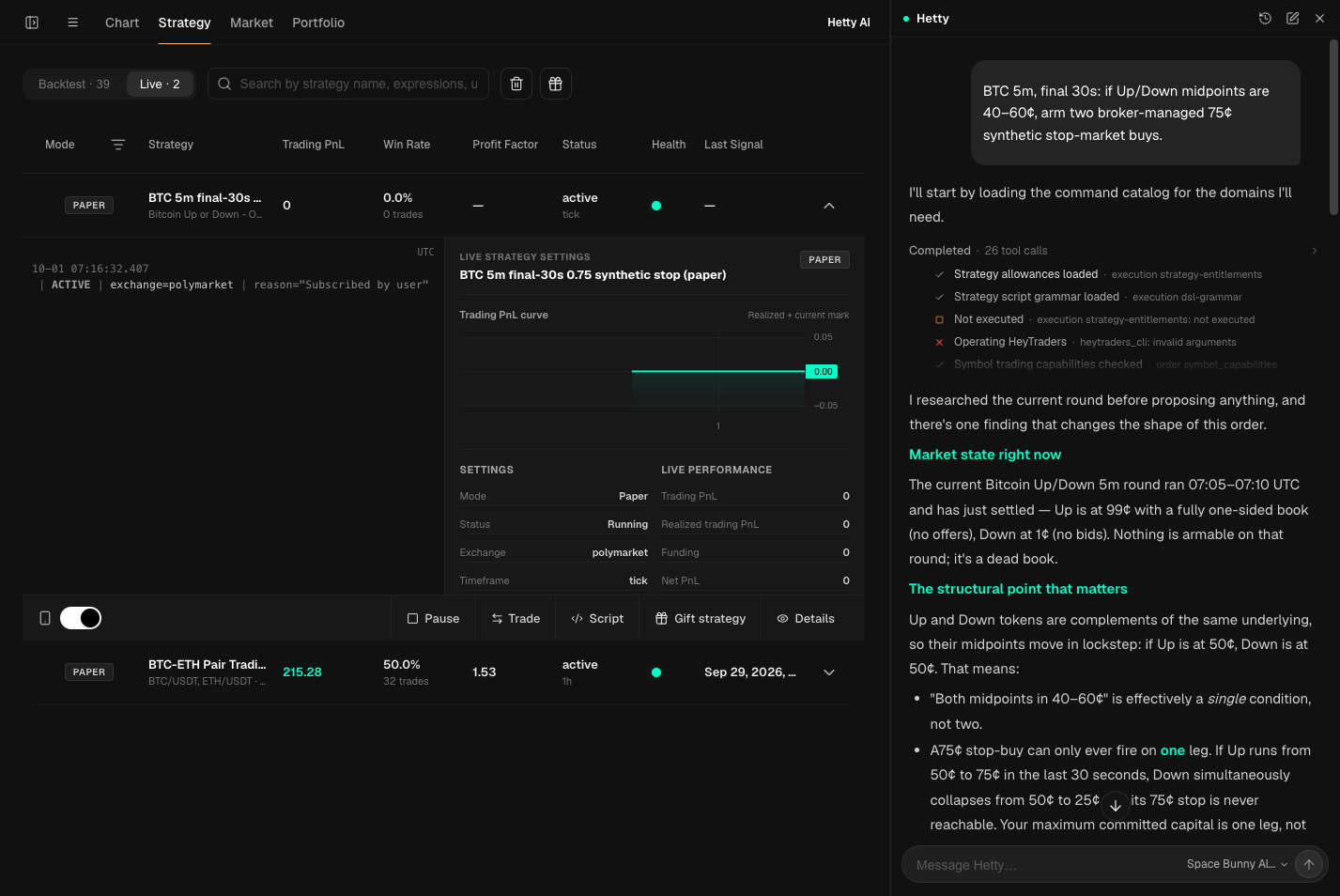
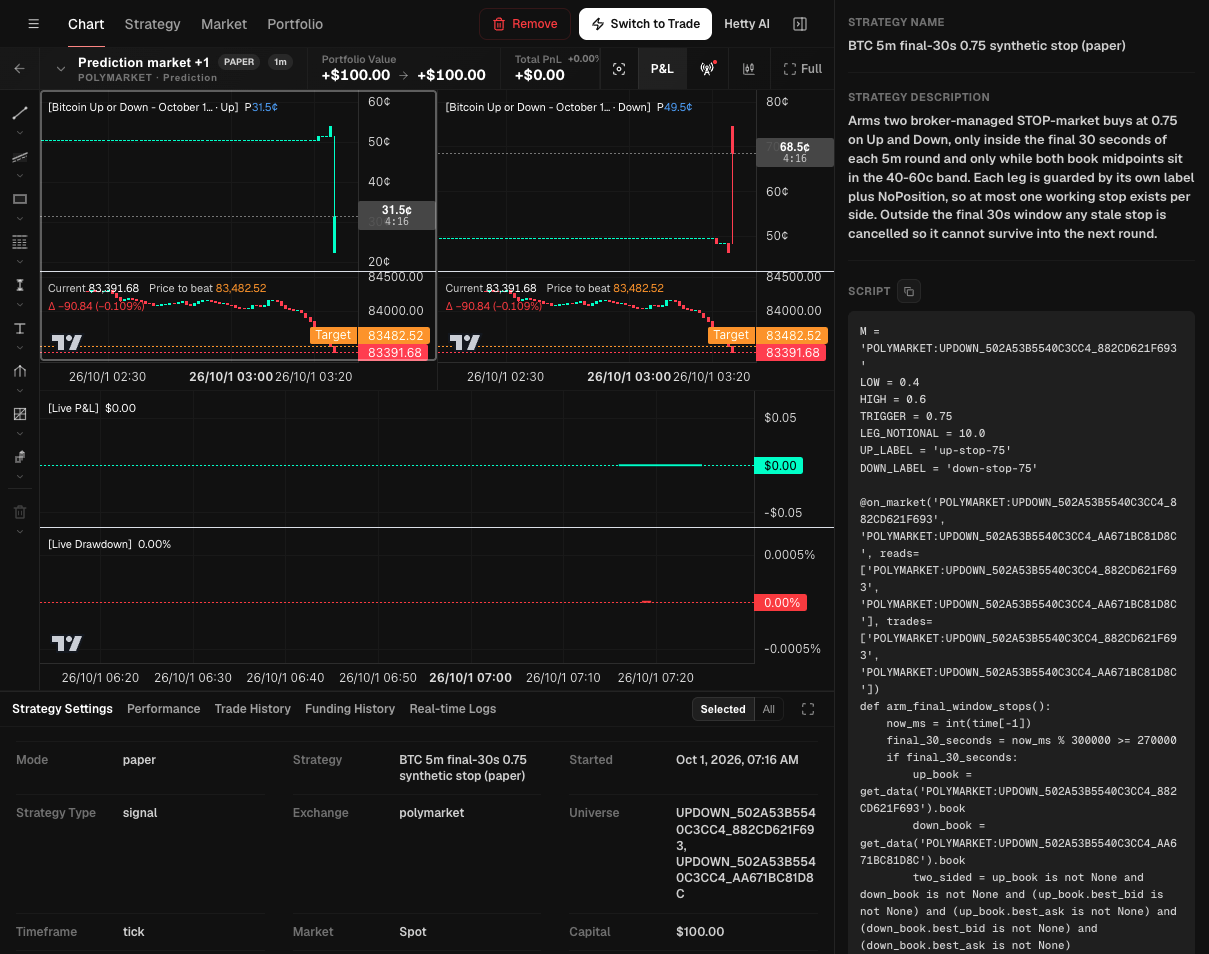
Runtime screenshots supplied on October 1, 2026. Paper uses simulated capital and incoming market data, not historical backtesting. These captures do not establish filled orders or profitability. Other strategies listed in the first screen are not results of this example; intermediate chat diagnostics remain unchanged.
The screenshot below shows the second workflow: order-level TP/SL controls, not a custom strategy bot.
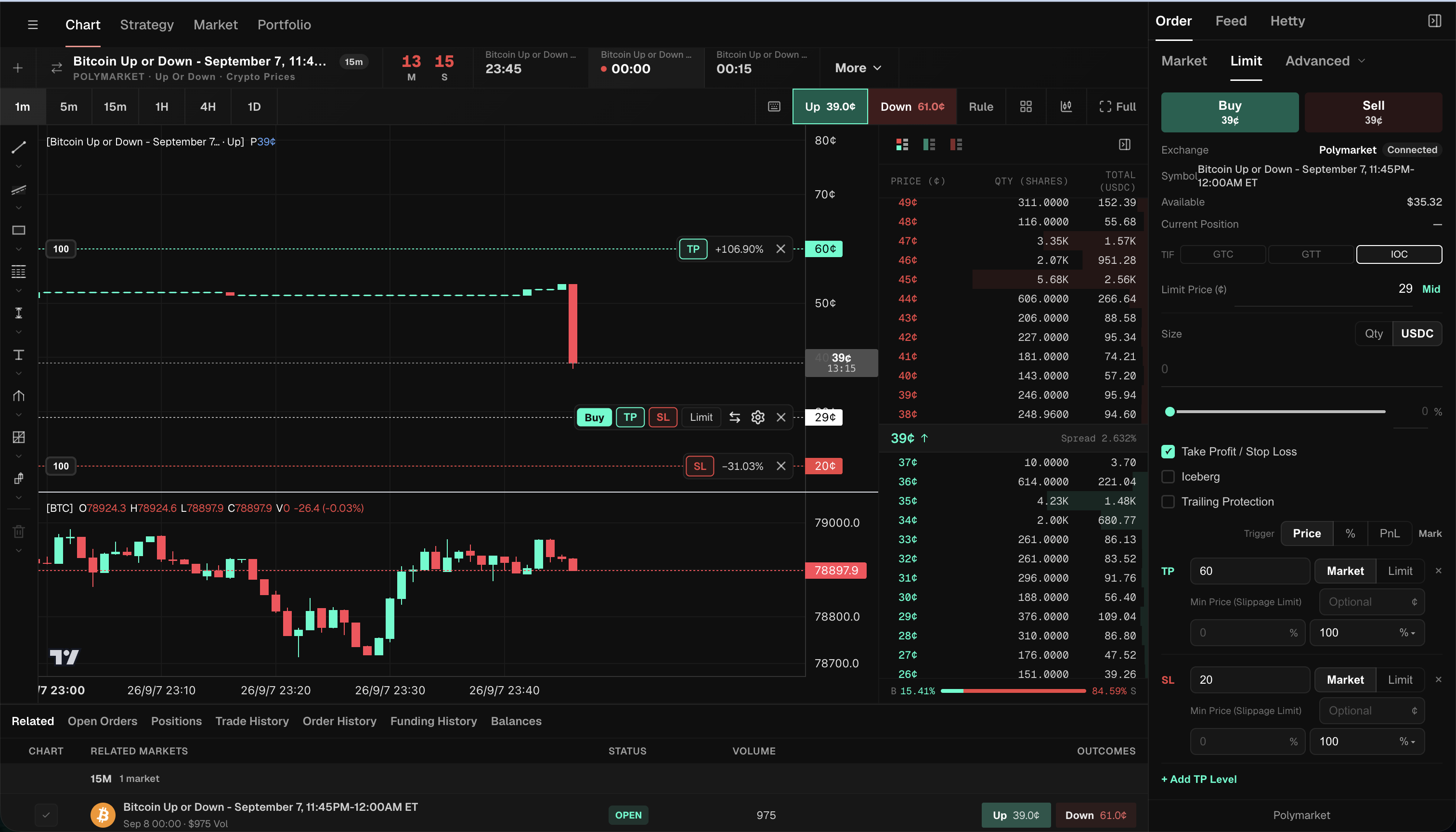
For this order-automation workflow:
- Connect Polymarket and choose the market and outcome you want to manage.
- Enable Take Profit / Stop Loss in the order ticket and choose the trigger units.
- Enter your own TP/SL values, execution choices and exit sizes, then review them on the chart before submitting.
Use the stop-loss walkthrough or take-profit walkthrough for the individual fields. Custom strategies use a different workflow: describe the rule, inspect its generated DSL, then run it in Paper or Live.
What is a Polymarket trading bot?
A Polymarket trading bot is a rules-based program that reads prediction-market data, decides whether a condition is true, and submits or manages an order without waiting for a person to click. The rule might be simple, such as selling when a price falls below a threshold, or more structured, such as maintaining a grid of orders across a range.
The word “bot” describes the automation, not the strategy. Two bots can use the same market data and behave completely differently because their entry, exit, sizing, and risk rules differ. A bot gives a rule speed and consistency; it does not supply the rule with an edge.
Polymarket publishes official REST APIs and WebSocket streams for programmatic access. Its Gamma API helps discover events and markets, the CLOB API provides prices and order books and supports order management, and the Data API exposes positions and activity. A trading bot combines the relevant surfaces into one operating loop.
How does a Polymarket trading bot work?
A reliable bot repeats five jobs: discover the market, receive current data, evaluate a rule, submit a valid order, and reconcile what actually happened. The last step is easy to overlook. Sending an order is not the same as receiving a fill.
- Select a market and outcome. The bot identifies the event, outcome token, and market rules it is allowed to trade.
- Read current state. It consumes prices, the order book, and — when relevant — account orders, fills, and positions.
- Evaluate the strategy. It checks a deterministic condition such as a price threshold, spread, time, inventory level, or combination of signals.
- Create and submit an order. The request includes side, price, size, and order behavior, with the required authentication and signatures.
- Reconcile and manage. The bot observes whether the order is open, partially filled, filled, cancelled, rejected, or expired, then updates its local state before making another decision.
Polymarket’s order lifecycle documentation explains an important detail: all orders enter the CLOB as limit orders. What the interface calls a market order is a limit order priced to execute immediately against available resting liquidity. Automation therefore does not bypass the native book or promise a particular execution price.
Does Polymarket support automated trading?
Polymarket provides official APIs and SDKs for programmatic market data and trading, so automation is an intended technical integration path. That does not mean a bot can ignore platform rules. It must use the supported authentication flow, respect request limits, and operate only where order placement is available.
For direct CLOB trading, Polymarket documents two authentication layers: a wallet signature establishes control and creates or derives credentials, while API credentials authenticate private requests. Order placement also carries the wallet authorization for the order itself. Developers must protect those credentials and implement signing correctly rather than placing secrets directly in source code.
Automation must also respect API rate limits and current geographic restrictions. A bot is not a way around account eligibility, local rules, or access controls. Check the latest official documentation for your location before connecting any automated execution.
What can you automate on Polymarket?
A custom bot can automate the repetitive parts of a trading plan: monitoring, order placement, cancellation, position-aware exits, and strategy decisions. The exact set depends on the software around the native CLOB.
Common workflows include:
- Price-triggered entries — buy or sell after a market reaches a specified level.
- Risk exits — submit a stop loss when price moves against an existing position.
- Profit exits — close or reduce exposure with a take-profit rule.
- Dynamic protection — follow favorable price movement with a trailing stop.
- Range execution — distribute orders across levels with a grid.
- Linked instructions — pair a target and stop with OCO logic so one action cancels the other.
- Scheduled execution — divide a larger order across time with TWAP or weighted slices.
- Cross-market conditions — act in one market only after a separate observable condition becomes true.
HeyTraders supports custom Polymarket strategy rules through Signal DSL, as well as a separate set of order-level algo controls. A strategy can combine supported market and reference data; an algo order watches its configured condition for an individual order. See the complete Polymarket algo-order guide for those order types.
Full API bot, trading terminal, or strategy automation?
These routes solve different problems. Choose according to how much control you need and how much infrastructure you want to operate.
| Route | You define | You must operate | Best fit |
|---|---|---|---|
| Full API bot | Code, signals, strategy logic, order logic, state model | Hosting, signing, retries, monitoring, upgrades | Developers who need control over the complete integration |
| HeyTraders strategy bot | Market, external signals, entry/exit rules, sizing | Review generated DSL; choose Paper or Live | Traders who want custom rules without building their own API integration |
| Trading terminal | Orders and supported terminal rules | Account connection and active supervision | Traders who want manual control in a consolidated interface |
| Algo-order automation | Supported order parameters and trigger conditions | Order review, permissions, and ongoing risk decisions | Traders who want specific order behavior automated |
If your main decision is which interface to use, see our Polymarket trading terminal comparison guide for account compatibility, order previews, workflow, and total-cost checks.
A custom API bot is flexible, but flexibility creates responsibilities. If the process restarts, it must reconstruct open orders and positions before trading again. If a request times out, it must determine whether the order reached the exchange before retrying. If the WebSocket disconnects, it must recover missed state rather than assume nothing changed.
HeyTraders also supports custom Polymarket strategies in Paper and Live modes. The generated Signal DSL makes the selected data sources, conditions, and order targets reviewable before you choose how to run the strategy.
What makes a bot reliable enough to run unattended?
Continuous operation requires more than a correct entry signal. A production bot needs an authoritative view of orders and positions, safeguards against duplicate actions, and a defined response when data or connectivity becomes stale.
Before leaving a custom bot unattended, verify that it can answer these questions:
- Is the data fresh? A disconnected price stream must stop or degrade safely rather than trade on an old quote.
- Was the order accepted? A timeout is an unknown result, not proof that the order failed.
- What filled? Partial fills change remaining size and exposure.
- Can an action repeat? Retries should not create duplicate orders or exceed the intended position.
- What happens after restart? The bot should reconcile exchange state before resuming decisions.
- What happens near resolution? New information, thin liquidity, and market closure can change execution conditions quickly.
- How is risk capped? Maximum position, order size, loss, and number of concurrent instructions should be explicit.
This is why a profitable-looking rule is only one component of automation. The operational state machine around that rule determines whether the live system behaves as intended.
What are the main risks of Polymarket bots?
The main risks are strategy failure, adverse execution, incorrect state, credential exposure, and resolution uncertainty. Automation can magnify an error because it acts repeatedly and without fatigue.
Strategy risk
A price pattern does not prove an informational edge. Backtested or historical behavior can disappear when participants, liquidity, or the event narrative changes. Do not infer future profit from a short sample or one successful market.
Liquidity and fill risk
A trigger is a condition, not an execution guarantee. A marketable order consumes the prices and sizes available in the book, while a resting limit order may not fill. Large orders can move through several levels, and fast news can change the book before an order arrives.
State and software risk
Duplicate requests, stale data, missed fills, and incorrect position assumptions can make a bot trade more than intended. Define a kill switch, maximum exposure, and a reconciliation process before 24/7 custom-bot operation.
Security and access risk
Use the narrowest permissions supported by the integration, protect API credentials, and never disclose a wallet recovery phrase. Confirm how a tool authorizes orders and how access can be revoked before funding the connected account.
Event and resolution risk
Prediction-market prices reflect beliefs about an outcome, but settlement follows the market’s written resolution rules. Read those rules before trading. A correct view of the real-world event can still lead to an unexpected trading result if the market resolves according to a narrower or different criterion.
How to make a Polymarket bot: when you want to build your own API integration
A Polymarket trading bot tutorial for a custom integration needs more than an exit ticket. If you want to own the data connections, signing, hosting, and execution state, Polymarket’s API documentation is the place to start.
Start with Polymarket’s official SDK and API documentation. Define the exact market and outcome, connect the required data stream, implement the strategy rules, then review authorization, sizing and execution behavior before allowing real orders. Keep credentials out of source code and chat prompts.
That development path is different from the custom strategy and order-level automation already available in HeyTraders. If you use HeyTraders, describe the rule, inspect its generated DSL, and choose Paper or Live instead of maintaining your own API client.
Polymarket automation launch checklist
Before enabling a custom bot or an algo order, check all of the following:
- The market and outcome token are correct.
- Entry, exit, sizing, and stop conditions are unambiguous.
- Maximum exposure is defined independently of the signal.
- Trigger behavior and native order behavior are understood.
- Partial fills and unfilled orders have a planned response.
- Credentials use the minimum required access and can be revoked.
- Geographic availability and current platform rules have been checked.
- The market’s resolution source and edge cases have been read.
- You have a way to pause the automation and inspect open orders.
Frequently Asked Questions
Does Polymarket allow trading bots?
Polymarket provides official APIs and SDKs for programmatic market data and order placement. HeyTraders also supports custom Polymarket strategies in Paper and Live modes, alongside separate order-level algo controls.
Do I need to use the Polymarket API to automate trading?
Not when using HeyTraders. Describe a custom strategy, review the generated Signal DSL, and choose Paper or Live. Developers building their own integration can use Polymarket’s official APIs and SDKs.
What can a Polymarket trading bot automate?
A custom strategy can evaluate supported market data and submit rule-based entries. HeyTraders also offers supported order-level instructions such as take profit and stop loss in the trading terminal.
Are Polymarket trading bots profitable?
A bot does not create a profitable edge. It executes a strategy consistently, but results still depend on the strategy, liquidity, fees, market conditions, fills, and resolution. Automated trading can lose money, including the full amount at risk.
Can a Polymarket bot guarantee a stop-loss fill price?
No. A trigger price tells the automation when to send an order; it is not a guaranteed fill. The resulting order executes against available liquidity, so slippage or no fill can occur depending on the order type and market.
One last thing
Was this story helpful?
Your perspective helps us improve our guides.
No sign-in needed. An anonymous session remembers your response on this browser. Privacy
A little more perspective.
Polymarket Trading Strategy: How to Automate It
Combine outside data like weather forecasts or Binance prices with Polymarket order rules—then inspect the generated DSL before running it.
Polymarket Trading Terminals: How to Compare Your Options
Compare Polymarket terminals by the work you need to do: follow related markets, inspect the order book, prepare orders on a chart, and manage supported exit instructions.
Polymarket Algo Orders: The Complete Guide to Advanced Order Types
Polymarket natively supports only limit orders. Here is a complete overview of algo order types — stop loss, take profit, trailing stop, grid, OCO, TWAP — and how to add them.